article
Bolt Torque and Pretension Calculator: API and Metric Handbook Method Explained
A beginner-friendly but detailed guide to bolt preload, torque, pressure separation, structural shear, utilization, and PDF report checking in the EnggTools bolt torque calculator.
Published Jun 13, 2026 - Maintained by Ashish Kapoor
This technical page is maintained by Ashish Kapoor, a project engineering lead. Use it as a learning and calculation-review aid, then verify critical work against current standards, project documents, supplier data, and competent engineering review.
Found an assumption, unit, formula, or standards-reference issue? Send the page URL through the contact page so it can be corrected.
Have you ever tightened the lid on a jam jar? Twist it just enough and it seals tight. Twist too little and it leaks. Twist way too much and the lid can crack. Bolting two metal parts together works the same way - except the "jar" might be a pipe full of high-pressure gas, and getting the twist wrong can be dangerous.
The bolt torque and pretension calculator takes the size, grade, and friction condition of a bolt and works out how hard to tighten it, how much "hug" (preload) that tightening creates, and whether the bolt and the joint stay safe afterward. This article goes through the calculator field by field - every input box and every output number - and explains what it means, why it matters, and exactly how the calculator works it out. Where a number comes from a published standard or handbook, the section is named so you (or your reviewer) can look it up.
This is a long article on purpose. You do not need to read it top to bottom in one sitting - use it as a reference. Skip to the section for whichever input or output you are curious about, or follow along with the worked example in Part 10, which uses the calculator's own default values from start to finish so every number can be checked.
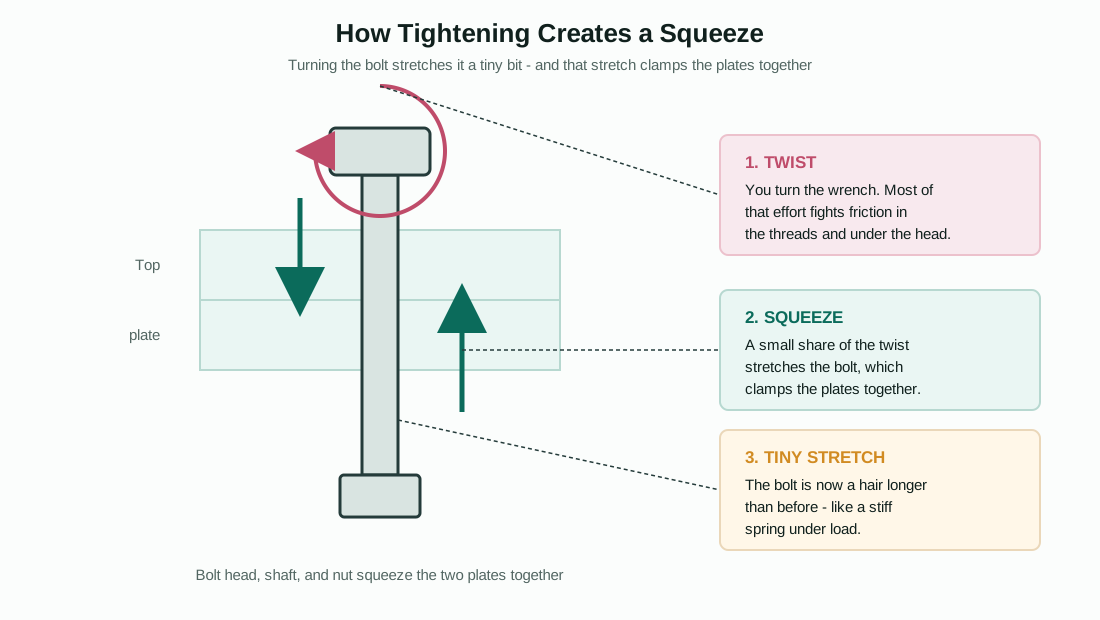
Figure 1: Tightening a bolt twists it, squeezes the plates together, and stretches the bolt by a tiny amount. Most of this article is about quantifying that twist, that squeeze, and that stretch.
Part 1 - The big picture: what goes in, what comes out
The calculator is organized into a left-hand column of input panels and a right-hand column of result panels. The left column asks about the bolt itself (size, grade), how hard you want to squeeze (preload target), how much friction is in the joint, the shape of the bearing surface under the nut or bolt head, and any extra loads the joint has to resist (pressure, external pull, sideways force). The right column then reports the torque to apply, the resulting preload, every stress the bolt experiences, and whether each of those stresses stays within a safe limit.
Underneath, there is really only one chain of cause and effect: you choose a target stretch (preload) for the bolt → the calculator works out the torque needed to produce that stretch, given the friction in the joint → it then checks that the bolt can survive that stretch plus whatever the joint asks of it afterward (pressure, external loads, sideways loads, and a small left-over twist). Every input field feeds into one of those three steps, and every output field reports on one of them. The rest of this article walks through that chain in the same order the calculator's panels do.
Part 2 - Thread, material, and scenario
This first panel tells the calculator which bolt you are using and what kind of job it is doing. Four things you choose here ripple through almost every later calculation.
Unit system
A simple switch between metric (millimetres, MPa, N·m) and imperial (inches, ksi, ft-lbf). This does not just relabel the units - it changes which thread and material tables are offered, and it switches which torque formula is used later (Part 7 explains both formulas). Engineers working on API oilfield equipment typically work in imperial units with ksi material strengths, while general industrial and European work is usually metric.
Thread size
This is the bolt's nominal size, for example 1-8 UN (1 inch diameter, 8 threads per inch) or M20 x 2.5 (20 mm diameter, 2.5 mm pitch). Three numbers come out of this single choice, and they drive nearly every formula later in the calculator. The reference geometry follows ISO 724 for metric threads (BUFAB Order from Chaos handbook, Section 5.2) and the equivalent unified-thread relationships for inch threads.
Thread pitch (P). The distance the bolt advances along its axis for one full turn of the nut. For a metric thread it is given directly (e.g. 2.5 mm); for an inch thread it is 1 / (threads per inch) - so an 8-UN thread has a pitch of 1/8 = 0.125 in. A finer pitch (smaller P) means more threads per inch and, as you will see in Part 7, a slightly different torque-to-preload relationship.
Pitch diameter (d2, or E for inch threads). Picture the thread's V-shaped groove. The pitch diameter is the diameter of an imaginary cylinder that slices through the thread exactly where the groove is half cut away - roughly the "middle" of the thread flank. It matters because the thread acts like a screw ramp wrapped around this cylinder, and the steepness of that ramp (the helix angle) depends on this diameter together with the pitch. The calculator computes it as:
d2 = d − 0.649519 × P (metric) or E = D − 0.649519 / n (inch, n = threads per inch)
Stress area (As). A bolt's threaded section is not a solid cylinder - the thread grooves remove material. The stress area is the "effective" cross-sectional area engineers use for every strength calculation, smaller than the area you'd get from the bare nominal diameter. It is computed as:
As = (π/4) × (d − 0.9382 × P)2 (metric) or As = (π/4) × (D − 0.9743 / n)2 (inch)
Every load, every stress, and every "percent of yield" number later in the calculator is ultimately load ÷ As or load × As - so this one number is the foundation the whole strength check is built on. Figure 4 shows how As, the pitch diameter, and the bearing-face diameters discussed in Part 6 all relate to each other on a single bolt.
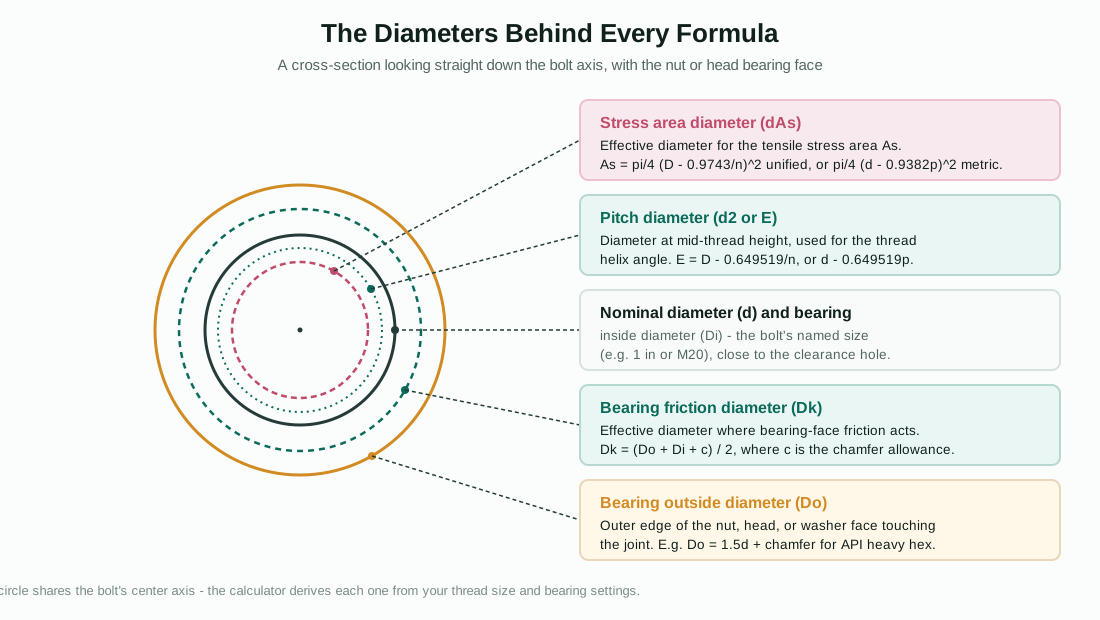
Figure 4: Every diameter the calculator uses, shown as concentric circles around the same bolt axis.
Material / grade
This selects the bolt's strength class - for example ISO 898 class 8.8, or ASTM A193 grade B7. Each grade carries three strength numbers, all expressed as a stress (MPa or ksi):
Proof strength. The stress at which a bolt is certified not to take a permanent set when tested - the traditional "do not exceed this for long-term clamping" limit.
Yield strength. The stress at which the steel begins to deform permanently (stop behaving like a spring). For many of the imperial bolting grades in this calculator (e.g. B7/L7), proof and yield are the same number; for the metric ISO 898 classes they are slightly different, with yield somewhat higher than proof.
Tensile strength. The stress at which the bolt would actually break in a tension test. This is the highest of the three and is mainly used as a reference point - most of the calculator's checks are against proof or yield, not tensile.
If you pick "custom" material, you type these three numbers yourself from a material certificate. Whichever grade you pick, these three numbers become the proofStress, yieldStress, and tensileStress used everywhere below.
Application scenario
This tells the calculator what kind of joint it is, which sets a sensible starting point for how hard to tighten and which checks matter most:
Pressure-containing closure / API flange. The default preload basis is yield, with a starting target of 67% of yield. This reflects API Specification 17D, Section 5.1.3.5.1, which recommends a bolting preload between 50% and 67% of yield (SMYS) after make-up for this type of joint. The calculator's review warnings will flag a target below 50% of yield (face contact and gasket seating may be at risk) or above 67% (flange integrity and procedure validation should be reviewed).
Structural / slip-critical joint. Defaults to 70% of proof load. The dominant checks for this scenario are slip resistance (Part 6 and Part 9) and any external tensile load on the joint.
General machinery joint. Defaults to 75% of proof load. Joint stiffness and preload-loss checks matter most here, since these joints often see repeated load cycles.
Changing the scenario does not lock you into its default percentage - it just pre-fills a sensible starting point and changes which review notes appear. You can override the basis and percentage in the next panel.
Part 3 - Setting your preload target
This is where you tell the calculator how hard you want the bolt to "hug" the joint. Everything from here on - torque, stresses, safety margins - is built on top of this one target.
Preload mode: percent vs. direct
You can set the target two ways. Percent mode (the default) lets you say "I want the preload to be a certain percentage of a reference strength" - the calculator then works out the actual force. Direct mode lets you type the target preload force itself (in kN or kip), bypassing the percentage entirely - useful if a project specification or a bolt-tensioner's load cell already gives you a target force.
Preload basis and preload percent
In percent mode, you choose which strength the percentage applies to - proof, yield, tensile, or a custom stress you type in yourself - and then a percentage (the calculator offers quick presets of 50, 60, 67, 70, 75, and 80%, matching the values commonly seen in bolting procedures and the API 17D band mentioned in Part 2).
The calculator first works out the basis stress - simply the proof, yield, tensile, or custom stress you selected. The target stress is then:
target stress = basis stress × (preload percent / 100)
For example, with a yield strength of 105 ksi and a target of 67%, the target stress is 105 × 0.67 = 70.35 ksi.
Target preload (the force itself)
Stress is force spread over area, so converting the target stress into an actual force just multiplies by the stress area (As) from Part 2:
target preload (Fi) = target stress × As
This single number, Fi, is the "hug" the calculator is designing the tightening procedure to produce. Everything in Part 7 (torque) is calculated to achieve this Fi, and everything in Part 9 (strength and clamp checks) starts from this Fi and asks "what happens to this force once the joint is in service?"
Direct preload
If you used direct mode instead, this is simply the force you typed, converted into the calculator's working units. The calculator still reports the equivalent target stress (Fi / As) and the percentage of proof and yield that this represents, so you can sanity-check a project-specified force against the strength of the bolt you have selected.
Custom basis stress, proof strength, yield strength, tensile strength
These four fields only appear when you choose "custom" material or "custom" preload basis. They let you override the standard table values with numbers from an actual material certificate or project specification - for example, if your bolts were supplied with a certified yield strength slightly different from the nominal grade value. Whatever you enter here flows directly into the proof/yield/tensile values used throughout the rest of the calculation.
Part 4 - Friction and tightening control
This panel answers the question Figure 2 illustrates: when you turn a wrench, how much of that effort actually goes into stretching the bolt, and how much is lost to friction? The answer here directly sets the torque the calculator will tell you to apply.
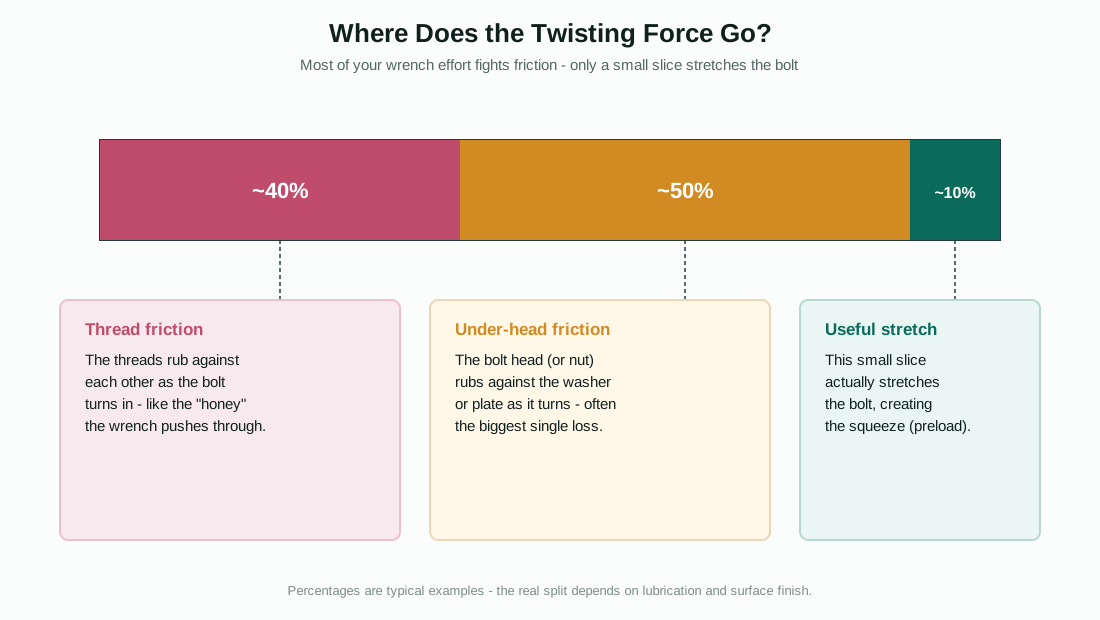
Figure 2: Most of your wrench effort fights friction in the threads and under the bolt head or nut. Only a small slice actually stretches the bolt.
Friction condition (preset) and friction coefficients (μthread, μbearing)
Friction shows up in two separate places, and the calculator tracks them separately because they are physically different surfaces:
μthread is the friction between the male and female thread flanks as they slide past each other while the bolt turns in. μbearing is the friction between the underside of the bolt head (or the nut face) and the part it rotates against. The friction-condition presets bundle both numbers together for common situations, drawn from the BUFAB Order from Chaos handbook, Section 9.1, the Arvid Nilsson handbook, Section 5.2, Table 34, and API 6A Annex H, which gives f = 0.07 for fluoropolymer-coated threads and f = 0.13 for bare, well-lubricated threads.
If you select "custom," you can type μthread and μbearing independently - useful if, for example, the threads are coated but the bolt is bearing on a bare washer. The calculator's review warnings flag any friction value outside roughly 0.03-0.25, since values outside that band usually indicate a data-entry error rather than a real bolted joint.
Friction is the single biggest source of uncertainty in bolt tightening. The same torque, applied to the same bolt, can produce a noticeably different preload depending on whether the threads are dry, oiled, or coated - which is exactly why the next two fields (tightening method and scatter) exist.
Tightening method and tightening scatter
However carefully you control torque, friction varies slightly from bolt to bolt and from one tightening to the next - even with identical parts, lubricant, and procedure. Tightening scatter is the calculator's way of representing that real-world variability as a plus-or-minus percentage band around the target preload.
The tightening-method presets set a starting scatter based on how the bolt is actually tightened: a hand or pneumatic torque wrench typically has around ±16% scatter; calibrated hydraulic torque tooling tightens that to around ±12%; bolt tensioners (which stretch the bolt directly and largely sidestep thread friction) bring it down to around ±10%; and impact wrenches or torque bars can be as wide as ±32%, which the calculator flags as potentially unsuitable for critical bolting. These figures correspond to the SF/FFm scatter ratios discussed in BUFAB Order from Chaos, Section 9.5. You can also type a custom scatter percentage if your procedure has been qualified with a measured value.
The calculator applies this scatter directly to the target preload to get a realistic range of what tightening might actually achieve:
minimum assembly preload = target preload × (1 − scatter)maximum assembly preload = target preload × (1 + scatter)
The maximum assembly preload is important because it represents the worst case for "is the bolt over-stressed right after tightening" - it is used in the bolt strength checks of Part 9. The minimum assembly preload feeds into the clamp-loss calculation below, representing the worst case for "is there still enough squeeze left in service."
Clamp loss percent
Even a perfectly tightened bolt loses a little of its squeeze over time - the joint surfaces settle slightly (a process called embedment), gaskets compress further, and the parts relax. Clamp loss percent is your estimate of how much of the original preload disappears this way. The calculator applies it to both the target and the minimum assembly preload:
retained preload after loss = target preload × (1 − loss)minimum retained preload after loss = minimum assembly preload × (1 − loss)
These "after loss" numbers represent the realistic long-term clamp the joint can be relied on for, and they are what the clamp and structural checks in Part 9 are built on. A typical starting value is around 5%, but gasketed joints or soft-faced joints may lose considerably more and deserve a higher number here.
Number of bolts
Many of the loads in Part 5 (pressure, external tension, shear) act on the whole joint, but the strength checks in Part 9 are per individual bolt. The calculator divides total loads by this number to get the share each bolt carries, and multiplies the per-bolt retained clamp back up to get the joint's total clamping force (used in the slip-resistance check of Part 9).
Part 5 - Bearing geometry
"Bearing" here means the flat face that the bolt head or nut rotates against - the surface where the under-head friction from Part 4 actually acts. The size of that face matters because friction torque depends on how far from the bolt's centerline the friction force acts: a wider bearing face means the friction force acts at a larger effective radius, which means more torque is needed to overcome it for the same preload.
Bearing mode
This chooses how the calculator works out the bearing face's dimensions:
API heavy hex + chamfer. Matches the heavy-hex-plus-chamfer geometry behind the API 6A Annex H Table H.1/H.2 torque tables - the bearing outside diameter is set to 1.5 × nominal diameter + chamfer allowance, with a small chamfer allowance (0.125 in or 3.175 mm) accounting for the relief chamfer machined into the nut or head face.
Standard flat. A simpler assumption with no chamfer: outside diameter = 1.5 × nominal diameter, inside diameter = nominal diameter.
Flange / collar. For a wider bearing surface such as a flanged bolt head or a load-spreading collar: outside diameter = 1.8 × nominal diameter.
Custom. Lets you type the bearing outer diameter, inner diameter, and chamfer allowance directly - useful for measured hardware, special washers, or non-standard nuts.
Bearing outer diameter (Do), bearing inner diameter (Di), bearing chamfer allowance (c)
These three numbers describe the annular ring (a flat washer-shaped area) where the bolt head or nut actually contacts the joint: Do is the outside edge of that ring (the across-flats or across-corners size of the nut/head, or a washer's outside diameter); Di is the inside edge (essentially the clearance-hole diameter, close to the bolt's nominal size); and c is a small allowance for a chamfer or relief that effectively reduces the contact area slightly. In the "custom" mode you type these yourself; in the preset modes the calculator fills them in from the formulas above based on the thread size from Part 2.
Bearing friction diameter (Dk) - the output of this panel
The calculator combines Do, Di, and c into a single effective diameter that represents, on average, how far from the bolt's axis the under-head friction force acts:
Dk = (Do + Di + c) / 2
This Dk is the number that goes directly into the bearing-torque formula in Part 7. Figure 4 shows Dk alongside the other diameters from Part 2, all sharing the same bolt axis - the stress area diameter and pitch diameter are properties of the bolt's shank and threads, while Do, Di, and Dk describe the much larger bearing face under the head or nut.
Part 6 - Opening and structural loads
So far, everything has been about the bolt by itself. This panel describes what the joint has to resist once it is in service - pressure trying to pry it apart, an external pull trying to stretch it further, and a sideways force trying to slide the parts past each other.
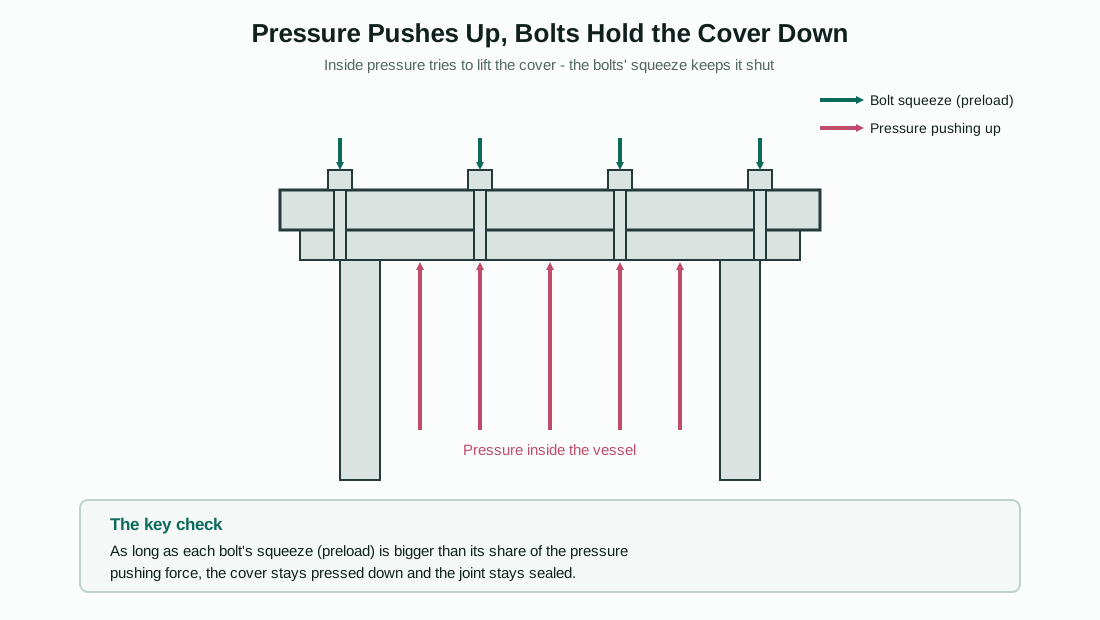
Figure 3: Internal pressure pushes the cover up; bolt preload squeezes it down. As long as each bolt's squeeze covers its share of that push, the joint stays sealed and the parts never actually separate.
Opening load source: manual vs. pressure-area
This chooses how the calculator works out the load trying to "open" the joint (pull the clamped parts apart). Manual lets you type a total or per-bolt tensile force directly - useful for structural connections or where the separating load comes from somewhere other than internal pressure (e.g. a crane hook load pulling on a bolted bracket). Pressure-area instead calculates the separating force from a pressure and an area, as described next.
Pressure, pressure area mode, pressure area, pressure diameter
For pressure-containing joints (covers, flanges, valve bonnets), the separating force comes from internal pressure pushing on the area it is sealed against. You can enter that area directly (area mode) or let the calculator compute it from a diameter (diameter mode, the usual case - enter the gasket or bore diameter the pressure acts across):
pressure area = (π/4) × diameter2 (diameter mode)
The total separating force, and each bolt's share of it, are then:
total separation force = pressure × pressure areaper-bolt separation force = total separation force / number of bolts
External tension and external tension mode
If the opening load source is "manual," this is the tensile force you type in directly - either as a total figure for the whole joint (the calculator divides by the bolt count) or already as a per-bolt figure (the calculator multiplies by the bolt count to get the joint total for reporting). Either way, the result feeds into the same "opening load per bolt" used by the clamp checks in Part 9, exactly as the pressure-derived force would.
Joint stiffness factor
Here is a subtle but important idea: when an external load tries to stretch a bolted joint, the bolt does not absorb the entire load - some of it is "absorbed" by the clamped parts simply becoming slightly less compressed. How much each side takes depends on their relative stiffness. The joint stiffness factor (often written Φ or C) is the fraction of the external load that ends up as additional bolt tension; the remaining (1 − factor) shows up as a reduction in the squeeze on the joint members. A typical value is around 0.2-0.3 for normal flanged joints with gaskets, meaning roughly 70-80% of an external pull is "absorbed" by the joint relaxing slightly rather than by the bolt stretching further. This single factor is what turns the per-bolt opening load into the two different effects used in Part 9: a small increase in bolt stress, and a larger decrease in the remaining clamp.
Shear load, slip coefficient, slip interfaces
Shear load is a sideways force trying to slide the joint's parts past each other - the kind of load a lap-jointed steel plate or a foundation bolt might see, rather than a pressure vessel. The calculator divides this by the number of bolts to get a per-bolt shear force, and uses it to compute a shear stress (Part 9) and a slip-resistance check (Part 9).
Slip coefficient (μslip) is the friction coefficient between the two clamped surfaces themselves (not the bolt threads or bearing face) - how much sideways force the squeezed-together parts can resist before they slip relative to each other, per unit of clamping force. Slip interfaces is the number of separate friction surfaces stacked in the joint (a simple lap joint has one interface; a joint with an extra splice plate on each side can have two). Both feed into the slip-resistance formula in Part 9.
Part 7 - How the calculator turns preload into torque
This is the calculation most people open the tool for: "I know what preload I want (Fi from Part 3) - how hard do I need to turn the wrench to get it?" The honest answer, as Figure 2 showed, is that very little of your wrench effort actually stretches the bolt. The calculator splits the total torque into two pieces - thread torque and bearing torque - and adds them together.
Why two torque formulas exist
The calculator uses one of two formulas depending on the unit system you picked in Part 2. Both describe the same physics (a screw thread is just an inclined ramp wrapped around a cylinder, and friction resists sliding up that ramp) but are written in the form each engineering tradition is used to.
API unified-thread detailed torque form (used for imperial units) follows the API 6A Annex H unified-thread torque relationship: thread torque comes from the thread-helix relationship below, and bearing torque is added separately.
Metric Kellermann-Klein / Arvid handbook k-form (used for metric units) follows the Arvid Nilsson metric handbook's method for calculating tightening torque using the Kellermann-Klein relationship, built from the metric pitch, pitch diameter, bearing friction diameter, and selected friction.
Despite the different-looking algebra, both reduce to the same idea: thread torque depends on the thread's helix angle and friction, while bearing torque depends on the bearing friction diameter (Dk from Part 5) and μbearing.
Thread torque - the thread-helix calculation
Imagine unrolling the thread's helix into a flat ramp. The pitch diameter (d2/E) is the "diameter" of that ramp, the pitch (P) sets how steep it is, and μthread is the friction you have to overcome sliding a load up it. The calculator computes:
Tthread = Fi × (d2/2) × (P + π × μthread × d2 × sec30) / (π × d2 − μthread × P × sec30)
where sec30 = 1 / cos(30°) ≈ 1.1547. This sec30 factor accounts for the 60° included angle of a standard V-thread - friction acts along the sloped thread flank, not straight across it, so the friction component is increased by this geometric factor. You do not need to memorize this formula; the important takeaway is that Tthread grows with Fi (the preload you chose), with the bolt's pitch diameter, and with μthread - bigger bolts, coarser pitches, and higher thread friction all mean more of your torque goes into this term.
For metric units, the same physical idea is expressed through a helix-angle/friction-angle relationship (φ for the helix angle, ρ′ for the friction angle adjusted by sec30), but it produces an equivalent thread torque.
Bearing torque - friction under the head or nut
This part is the same in both unit systems and is much simpler - it is just the preload force, times the bearing friction coefficient, times half the bearing friction diameter (Dk from Part 5), because torque = force × friction × radius:
Tbearing = Fi × μbearing × Dk / 2
This is why Part 5 (bearing geometry) matters so much - a larger Dk (a bigger nut, washer, or flange face) directly increases the bearing torque for the same preload and friction.
Total torque, and the secondary unit
The two pieces are simply added:
total torque = Tthread + Tbearing
The calculator reports this in your chosen unit system's primary torque unit (ft-lbf for imperial, N·m for metric) and also shows the equivalent in the other system's unit (N·m or ft-lbf) as the secondary total torque, purely for convenience - both numbers describe the same torque.
Thread torque share and bearing torque share
These are just Tthread / total × 100 and Tbearing / total × 100 - the percentage breakdown shown in Figure 2. For many common bolt and friction combinations, the split is roughly comparable between the two, which is the headline takeaway of this whole panel: a large share of your tightening effort is "wasted" on friction, and that share depends heavily on the friction values from Part 4 and the bearing geometry from Part 5 - not on the bolt's strength at all.
Equivalent nut factor (K)
Many shop procedures express the torque-preload relationship with a single simplified "nut factor" K, where T = K × Fi × d (d = nominal diameter). The calculator back-calculates what K value its detailed formula corresponds to:
K = total torque / (Fi × d)
This lets you compare the calculator's result against a K-factor your procedure or supplier might already quote, or use this K as a quick estimate for similar bolts under the same friction condition without re-running the full formula.
Metric torque coefficient
For metric calculations only, the calculator also reports a similar dimensionless coefficient relating total torque to Fi × (d + P) - a form sometimes used directly in metric handbook torque tables. It is shown as a cross-check alongside K; both describe the same physical torque, just normalized differently.
Part 8 - Reading the "Key outcomes" and "Torque split" panels
These two result panels are mostly a summary of numbers already introduced above, arranged for quick reading at the top of the results column.
Key outcomes shows: the tightening torque (total torque from Part 7) - the headline number you take to the shop floor; the target preload (Fi from Part 3); the maximum yield utilization (introduced in Part 9, the worst-case stress as a percentage of yield); the minimum retained clamp (from Part 4's clamp-loss calculation, used in Part 9's structural checks); the slip factor of safety (Part 6 and Part 9); and the equivalent nut factor (Part 7).
Torque split repeats the formula basis (which of the two formulas from Part 7 was used and why), the thread and bearing torque values and their percentage shares, the bearing friction diameter (Dk from Part 5), and the metric torque coefficient where applicable. Think of this panel as "show your work" for the single torque number in Key outcomes.
Part 9 - The bolt strength check: does the bolt itself survive?
Everything up to now has been about producing a target preload. This panel asks the harder question: once the bolt has that preload, plus whatever the joint asks of it in service, plus a little leftover twist from tightening - is the bolt still safe?
Bolt load mean and bolt load (maximum assembly)
These are the two "headline" forces the bolt actually carries, combining the retained preload from Part 4 with its share of the opening load from Part 6, weighted by the joint stiffness factor (Φ):
bolt load (mean) = retained preload after loss + Φ × opening load per boltbolt load (max assembly) = maximum assembly preload + Φ × opening load per bolt
The mean value uses the realistic, after-relaxation preload - representing typical long-term service. The maximum assembly value uses the high end of the tightening scatter from Part 4 - representing the worst case immediately after tightening, before any relaxation has occurred, which is when the bolt is most highly stressed.
Remaining clamp (mean) and remaining clamp (minimum)
While the bolt load looks at what the bolt feels, remaining clamp looks at what the joint feels - how much squeeze is left holding the parts together once the opening load has "stolen" its share:
remaining clamp (mean) = retained preload after loss − (1 − Φ) × opening load per boltremaining clamp (minimum) = minimum retained preload after loss − (1 − Φ) × opening load per bolt
Notice the (1 − Φ) here versus the Φ in the bolt-load formulas above - this is the joint-stiffness split from Part 6 in action. A larger Φ means more of the opening load goes to the bolt (increasing bolt load) and less comes out of the clamp (protecting remaining clamp); a smaller Φ does the opposite. If remaining clamp (minimum) ever goes negative, it means the joint faces have physically separated - for a pressure joint that means a leak path has opened, which is why this triggers one of the calculator's review warnings.
Tensile stress (mean) and tensile stress (maximum assembly)
These simply convert the two bolt-load numbers above into stresses by dividing by the stress area (As) from Part 2 - the same stress-area-based conversion used throughout the calculator:
tensile stress = bolt load / As
Shear load (total and per bolt) and bolt shear stress
These come straight from the shear load you entered in Part 6, divided by the number of bolts, and then converted to a stress the same way - shear stress = shear load per bolt / As. If you did not enter a shear load, these are simply zero and drop out of the combined-stress calculation below.
Combined stress (mean and maximum assembly) and combined yield utilization
If a bolt carries both tension and shear at the same time, the two stresses combine into an equivalent stress using the von Mises-style relationship commonly used for combined tension-and-shear checks:
combined stress = √(tensile stress2 + 3 × shear stress2)
The combined yield utilization is then simply this combined stress, expressed as a percentage of the bolt's yield strength: combined stress (max assembly) / yield strength × 100. If your joint has no shear load, the shear stress term is zero and this reduces to just the tensile stress as a percentage of yield.
The hidden twist: tightening torsional stress, kappa factor, and as-tightened equivalent stress
Here is something most simplified bolt calculations skip, but which this calculator includes deliberately: tightening a bolt does not just stretch it - it also leaves behind a small amount of twist. When you stop turning the wrench, the thread friction that resisted your turning effort (the Tthread from Part 7) does not fully release; a portion of that twisting stress stays "locked in" to the bolt shank, on top of the straight-line tensile stress from the preload.
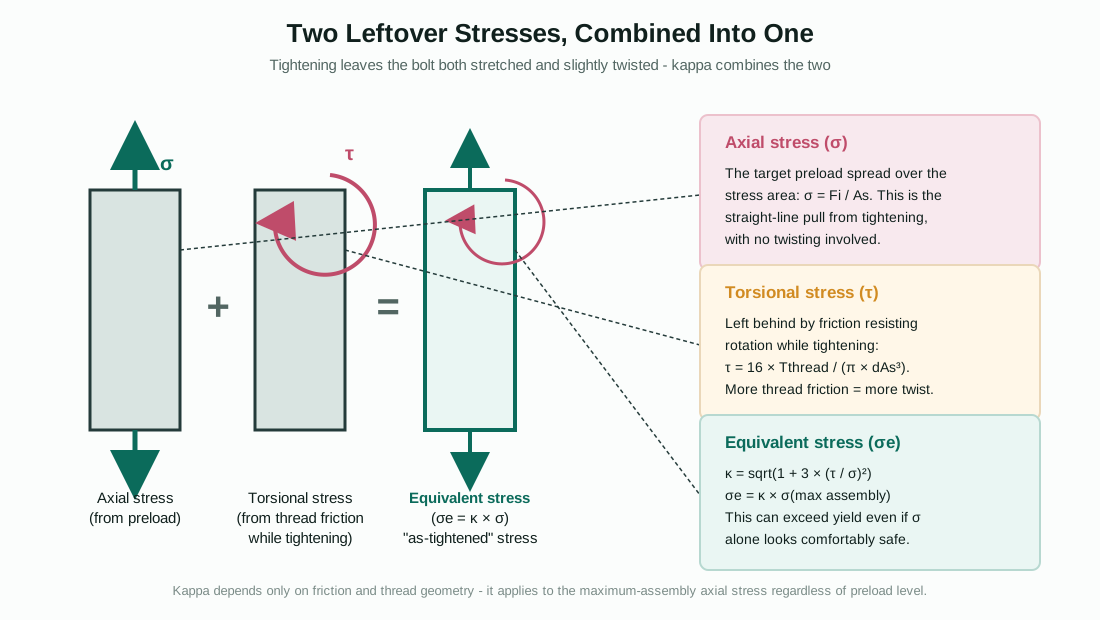
Figure 5: Tightening leaves the bolt both stretched (axial stress) and slightly twisted (torsional stress). Kappa combines the two into one "as-tightened" equivalent stress.
This is referenced in the BUFAB Order from Chaos handbook, Section 9.5, and the Arvid Nilsson handbook, Section 5.2, Formel 5. The calculator works through it in three steps:
Step 1 - torsional stress (τ). The thread torque from Part 7 (Tthread) is converted into a shear stress using the standard formula for torsional shear stress in a round shaft, where dAs is the diameter of an imaginary circle whose area equals the stress area (As) - i.e. dAs = √(4 × As / π):
τ = 16 × Tthread / (π × dAs3)
Step 2 - kappa factor (κ). Both the axial stress (from preload) and this torsional stress scale up and down together with the preload level - so their ratio is constant regardless of how hard the bolt is tightened. The kappa factor captures that ratio using the same von Mises-style combination as the shear check above:
κ = √(1 + 3 × (τ / σtarget)2)
where σtarget is the target axial stress from Part 3 (Fi / As). Because κ is a ratio, it depends only on the friction and thread geometry (which set τ and σtarget's relationship) - not on how hard you tightened the bolt. A κ close to 1.0 means the leftover twist is small relative to the stretch; a noticeably larger κ (say 1.05-1.15) means the twist is contributing meaningfully to the total stress the bolt feels right after tightening.
Step 3 - as-tightened equivalent stress and yield utilization. Because κ is independent of preload level, it can be applied directly to the maximum-assembly tensile stress from earlier in this panel to get the "as-tightened" equivalent stress - what the bolt actually experiences the moment tightening stops, combining stretch and twist:
as-tightened equivalent stress = κ × tensile stress (max assembly)as-tightened yield utilization = as-tightened equivalent stress / yield strength × 100
This is one of the most important numbers the calculator produces, because it can be the highest stress the bolt ever sees - higher than the plain tensile stress alone. If as-tightened yield utilization exceeds 100%, the calculator raises a specific warning: the bolt may be at or past yield the moment tightening finishes, even though the axial preload by itself looked acceptable. The usual remedies are to reduce the target preload (Part 3), reduce thread friction (Part 4, which lowers both Tthread and τ), or rely on stress relaxation after tightening if the procedure and material allow it.
Proof utilization, yield utilization, and maximum-assembly yield utilization
These three percentages give a quick "how close to the edge are we" picture using the bolt-load values from earlier in this panel: proof utilization = bolt load (mean) / proof load × 100; yield utilization = bolt load (mean) / yield load × 100; and maximum-assembly yield utilization = bolt load (max assembly) / yield load × 100. The calculator's review warnings trigger if mean preload exceeds 90% of proof load, or if the maximum-assembly load exceeds the yield load outright (100%) - both indicate the target preload or tightening scatter should be reconsidered.
Part 10 - The clamp and structural check: does the joint stay together?
This panel zooms back out from the single bolt to the whole joint - is there enough total clamping force to keep the parts in contact, and is there enough friction grip to stop them sliding sideways?
Pressure separation force (total and per bolt), manual opening force, external tension (per bolt and total)
These are largely a reporting echo of the inputs from Part 6, converted to consistent force units so you can see exactly what load the calculator used: the total and per-bolt force from pressure (if you used pressure-area mode), the total manual opening force (if you used manual mode), and the resulting per-bolt and total "opening load" figure that was actually fed into the bolt-load and remaining-clamp formulas in Part 9. Cross-checking these against your own hand calculation of the pressure load is a good first sanity check before trusting the rest of the panel.
Total clamp after loss
This is the sum of every bolt's retained preload (after the clamp-loss percentage from Part 4 has been applied), multiplied by the number of bolts:
total clamp after loss = retained preload after loss × number of bolts
This represents the total clamping force squeezing the joint's faces together, available to resist sliding - which feeds directly into the slip-resistance calculation below.
Slip resistance and slip factor of safety
Recall from Part 6 that the slip coefficient (μslip) describes how much sideways resistance each unit of clamping force provides at each friction interface, and slip interfaces counts how many such surfaces are stacked in the joint. The total sideways resistance available is:
slip resistance = μslip × number of slip interfaces × total clamp after loss
The slip factor of safety compares this resistance to the actual shear load you entered in Part 6:
slip factor of safety = slip resistance / shear load
If you did not enter a shear load, there is nothing to divide by and this value is left blank (not applicable) rather than shown as an artificially infinite number. If a shear load is present and the factor of safety comes out below 1.0, the calculator raises a warning - the joint's friction grip is not enough to prevent the parts sliding under the applied sideways load, and either more preload, more bolts, more slip interfaces, or a higher-friction surface treatment would be needed.
Review warnings and review notes
Every check described in Parts 7-10 that has a pass/fail or "needs attention" condition is collected into the review warnings list - this is the calculator's way of flagging, in plain language, exactly which numbers deserve a second look before you rely on the result. The conditions covered include: a zero or invalid target preload or torque; thread geometry or friction values outside sensible ranges; a pressure-containing joint's preload falling outside the 50-67% of yield band from API 17D Section 5.1.3.5.1; a negative minimum remaining clamp (joint separation/leak risk); a slip factor of safety below 1; combined or as-tightened stress exceeding yield; mean preload above 90% of proof; maximum-assembly preload exceeding yield; stainless bolting without anti-galling lubrication; and excessive tightening scatter for critical bolting.
The review notes panel separately collects the descriptive notes tied to your specific selections - the application scenario's guidance, the friction condition's note, the tightening method's note, and any notes attached to the chosen material (for example, sour-service limitations for B7M/L7M, or hydrogen-embrittlement cautions for the higher ISO 898 classes). These are not warnings as such, but background context worth reading alongside the numbers.
Part 11 - A complete worked example, start to finish
To tie everything above together, here is every number the calculator produces for its own default inputs: a 1-8 UN bolt (1 in nominal diameter, 8 threads per inch), material ASTM A193 B7 / A320 L7 (proof = yield = 105 ksi, tensile = 125 ksi), application scenario pressure-containing closure / API flange, preload basis yield at 67%, friction condition API coated / fluoropolymer, f = 0.07, bearing mode API heavy hex + chamfer, tightening method controlled torque wrench (16% scatter), 5% clamp loss, 8 bolts, joint stiffness factor 0.25, slip coefficient 0.2 with 1 slip interface, and no pressure, external load, or shear load entered.
Step 1 - Thread geometry (Part 2)
Pitch: P = 1/8 = 0.125 in. Pitch diameter: E = 1 − 0.649519/8 = 0.9188 in. Stress area: As = (π/4) × (1 − 0.9743/8)2 = (π/4) × (0.8782)2 ≈ 0.6057 in².
Step 2 - Preload target (Part 3)
Basis stress = yield = 105 ksi. Target stress = 105 × 0.67 = 70.35 ksi. Target preload: Fi = 70.35 × 0.6057 ≈ 42.6 kip (about 42,600 lbf). For reference, proof load = yield load = 105 × 0.6057 ≈ 63.6 kip, and tensile load = 125 × 0.6057 ≈ 75.7 kip. So 42.6 kip is indeed 67% of the 63.6 kip yield load, confirming Step 2.
Step 3 - Tightening scatter and clamp loss (Part 4)
With ±16% scatter: minimum assembly preload = 42.6 × 0.84 ≈ 35.8 kip, maximum assembly preload = 42.6 × 1.16 ≈ 49.4 kip. With 5% clamp loss: retained preload after loss = 42.6 × 0.95 ≈ 40.5 kip, and minimum retained preload after loss = 35.8 × 0.95 ≈ 34.0 kip.
Step 4 - Bearing geometry (Part 5)
API heavy hex with a 0.125 in chamfer allowance: Do = 1.5 × 1 + 0.125 = 1.625 in, Di = 1 in, c = 0.125 in. Bearing friction diameter: Dk = (1.625 + 1 + 0.125) / 2 = 1.375 in.
Step 5 - Torque (Part 7)
Using the API unified-thread form with μthread = μbearing = 0.07: thread torque works out to ≈ 203.2 ft-lbf and bearing torque to ≈ 170.9 ft-lbf, for a total torque of ≈ 374.1 ft-lbf (about 507 N·m). The split is roughly 54% thread / 46% bearing - notice that even with this relatively low-friction (fluoropolymer-coated) condition, nearly half the torque still fights friction under the nut rather than stretching the bolt. The equivalent nut factor is K = 374.1 × 12 / (42,600 × 1) ≈ 0.105 - a low value consistent with the low-friction coating.
Step 6 - Bolt loads and stresses (Part 9)
With no external opening load, the joint-stiffness factor has nothing to act on, so bolt load (mean) = retained preload after loss = 40.5 kip, and bolt load (max assembly) = maximum assembly preload = 49.4 kip. Converting to stress: tensile stress (mean) = 40.5/0.6057 ≈ 66.8 ksi, and tensile stress (max assembly) = 49.4/0.6057 ≈ 81.6 ksi. With no shear load, combined stress (max assembly) equals this same 81.6 ksi, giving combined yield utilization ≈ 77.7% of the 105 ksi yield strength.
Step 7 - The kappa factor and as-tightened stress (Part 9)
The stress-area-equivalent diameter is dAs = √(4 × 0.6057 / π) ≈ 0.878 in. The torsional stress from the 203.2 ft-lbf (2,439 lbf-in) thread torque is τ = 16 × 2,439 / (π × 0.8783) ≈ 18,337 psi ≈ 18.3 ksi. The target axial stress is 70.35 ksi (from Step 2). So:
κ = √(1 + 3 × (18.3/70.35)2) ≈ 1.097
Applying this to the max-assembly tensile stress: as-tightened equivalent stress = 1.097 × 81.6 ≈ 89.5 ksi, which is ≈ 85.3% of the 105 ksi yield strength. Notice this is noticeably higher than the 77.7% combined yield utilization from Step 6 - the leftover twist from tightening adds a meaningful 7-8 percentage points of additional utilization that a simple "force divided by area" check would have missed entirely.
Step 8 - Joint-level checks (Part 10)
Total clamp after loss across all 8 bolts: 40.5 × 8 ≈ 324 kip. Slip resistance: 0.2 × 1 × 324 ≈ 64.8 kip. Since no shear load was entered in this example, the slip factor of safety is not applicable - but this 64.8 kip figure shows how much sideways load the joint could resist if one were applied.
What the warnings panel would show
For these particular inputs, the preload sits exactly at the top of the API 17D 50-67% of yield band (Part 2), so no preload-band warning fires. The as-tightened yield utilization (85.3%) and combined yield utilization (77.7%) are both below 100%, so no overstress warning fires either. The friction values (0.07/0.07) are within the usual 0.03-0.25 range. In short, this default example represents a joint that the calculator considers comfortably within its checks - which is exactly why it makes a good baseline for exploring "what if" changes: try lowering the preload percentage, switching to a higher-friction condition, or adding a shear load, and watch which of these numbers move and which warnings appear.
Part 12 - Worked example: acetal nameplate with a component clamp limit
The earlier worked example is governed by the fastener preload target. Here is the newer scenario where the screw is not the weak part. A small acetal/POM nameplate is fastened to a metal equipment body. The metal body has a tapped hole, the nameplate has a clearance hole, and an M4 x 0.7 screw with a washer clamps the plate down. If the torque is chosen only from the steel screw size and strength, the screw may be fine but the acetal around the hole may crack or creep.
For this case, choose Component clamp limit at the top of the calculator. The calculation changes from how much preload can the fastener take? to how much clamp can the weakest clamped component safely tolerate under the washer?
Step 1 - Select the component allowable
Use the acetal plate as the governing component. Suppose the approved long-term allowable bearing/compressive stress for the acetal at service temperature is 8 MPa. Use a component safety factor of 1.5.
Design bearing stress = 8 / 1.5 = 5.33 MPa
This value should be a derated service value, not just a short-term catalog compressive strength. Plastics are sensitive to creep, temperature, washer edge pressure, hole finish, and edge distance.
Step 2 - Calculate washer bearing area
Assume the washer or load-spreader outside diameter is 9.0 mm, and the clearance hole/contact inside diameter is 4.5 mm.
A = pi/4 x (9.0^2 - 4.5^2) = 47.7 mm^2
The clamp limit per screw is therefore:
Fallow = 47.7 x 5.33 / 1000 = 0.254 kN
That is only about 254 N. A normal steel-screw preload target can be many times larger than this, so the acetal plate becomes the governing limit.
Step 3 - Include tightening scatter
Assume a controlled torque wrench with 16% preload scatter. The target clamp must be lower than the component limit, because one installation may land above the mean target.
Ftarget,max = 0.254 / (1 + 0.16) = 0.219 kN
This is the maximum safe target clamp per screw for the entered washer area, allowable stress, safety factor, and tightening scatter. If the calculator is used only to find a do-not-exceed torque, this is the clamp value it converts into torque.
Step 4 - Check the required retained clamp
Suppose the nameplate only needs 0.10 kN retained clamp per screw after plastic seating and creep. Use an estimated 20% embedment/creep relaxation loss.
Ftarget,required = 0.10 / (1 - 0.20) = 0.125 kN
The required installation target of 0.125 kN is below the maximum safe target of 0.219 kN, so this joint can meet the retained clamp requirement without exceeding the acetal bearing limit in this simplified check.
The highest expected assembly clamp at that target is:
Fmax = 0.125 x (1 + 0.16) = 0.145 kN
The corresponding maximum assembly bearing stress is:
Sbearing,max = 0.145 x 1000 / 47.7 = 3.04 MPa
This is below the 5.33 MPa design bearing stress.
Step 5 - Convert safe clamp into torque
Using the M4 x 0.7 metric thread geometry, thread friction mu_thread = 0.125, bearing friction mu_bearing = 0.125, and the washer/head bearing geometry in the torque model, the calculator gives approximately:
Installation torque = 0.10 N-m
If no retained clamp requirement is entered and the calculation is run at the component-safe target clamp, the do-not-exceed torque is approximately:
Do-not-exceed torque = 0.17 N-m
The exact torque depends strongly on friction and washer/head bearing geometry, so this should be treated as a controlled assembly setting, not a casual hand-tight instruction.
Step 6 - Read the engineering result
The answer is not that the M4 screw is weak. The answer is that the acetal plate is the governing part. The torque must be selected from the lower of the fastener-preload requirement and the component clamp limit.
If the required retained clamp had been higher than the component-safe target, the correct fix would not be to force more torque into the screw. Practical fixes include a larger washer or load spreader, more screws, a metal compression sleeve, a shoulder screw, a lower clamp requirement with threadlocker, a torque-limiting screwdriver, or a stronger/thicker component around the hole.
Part 13 - What this calculator will not do for you
This tool is a fast, transparent way to work through the standard tightening-torque and bolt-strength relationships described above, and to see exactly which inputs drive which outputs. It is not a substitute for a qualified engineer's review and sign-off on a critical joint. It does not account for corrosion, fatigue from repeated load cycles, unusual operating temperatures, gasket creep and relaxation behavior beyond the single clamp-loss percentage you enter, or the effects of a bolt being reused and re-tightened many times. For safety-critical or pressure-retaining equipment, always have the final torque values and joint design reviewed and approved by someone qualified to do so, against the specific project specification and code that applies.
If you want to work through your own bolt, head over to the bolt torque and pretension calculator and try changing one input at a time - the formulas in this article tell you exactly which output numbers should move, and by how much.